- Home
- China Unicom
- Check China Unicom Balance Online
How to Check China Unicom Balance Online: 5 Easy Methods (2026)
Updated 2026 · Step-by-step guide with screenshots

Whether you're topping up before a trip or just keeping an eye on spending, checking your China Unicom balance takes under a minute once you know the right method. Below are five ways to do it — from a free SMS shortcode that works instantly, to the full China Unicom website and App setup for ongoing account access.
Fastest method: Free SMS shortcode
If you just want your balance right now and you're in China (or your SIM has China Unicom roaming), send a blank text:
- Text
101to10010→ airtime balance - Text
2082to10010→ data balance
Both texts are free of charge and reply within seconds. This works for standard China Unicom SIM cards, including Talktiko SIM cards.
| Method | Works outside China? | Setup needed | Speed |
|---|---|---|---|
| App | Yes | Download + register once | Instant, ongoing |
| SMS shortcode | No (China SIM signal only) | None | Instant |
| Website | Yes (after setup) | Password reset in China first | Instant, ongoing |
| WeChat/Alipay | Yes | Link number in mini-program | Instant |
| Call 10010 | International rates apply abroad | None | 2–5 min wait |
Method 1: China Unicom Official App Best for regular checks
The China Unicom App (中国联通APP) is the most convenient long-term option — once linked to your number, you can check balance, data usage, and billing from anywhere in the world, not just while in China.
- Download "中国联通" (China Unicom) from the App Store or Google Play.
- Register with your China Unicom number while you have signal in China — you'll receive a verification code by SMS.
- Set a login password (6 digits, avoid obvious sequences).
- Once logged in, your balance, current plan, and monthly spending appear on the home screen automatically.

After this one-time setup, you can reopen the App anytime — including overseas on Wi-Fi — to check your balance.
Method 2: Free SMS & USSD Shortcodes Fastest, no setup
This is the quickest option if you're currently in China and just need a number, not ongoing account access.
- Airtime balance: text
101to10010 - Data balance: text
2082to10010 - USSD alternative: dial
*100#to see remaining data, voice minutes, and SMS in one screen (works on most handsets without opening the messaging app)
These texts and USSD codes are free of charge. The reply message includes your balance in RMB (¥), labelled 余额 (yú'é).
Method 3: China Unicom Website Login
Good for checking your balance from a computer, and required if you want detailed billing history rather than just a balance figure.
- While in China, turn on your phone with the China Unicom SIM card installed — you'll need to receive a text message during setup.
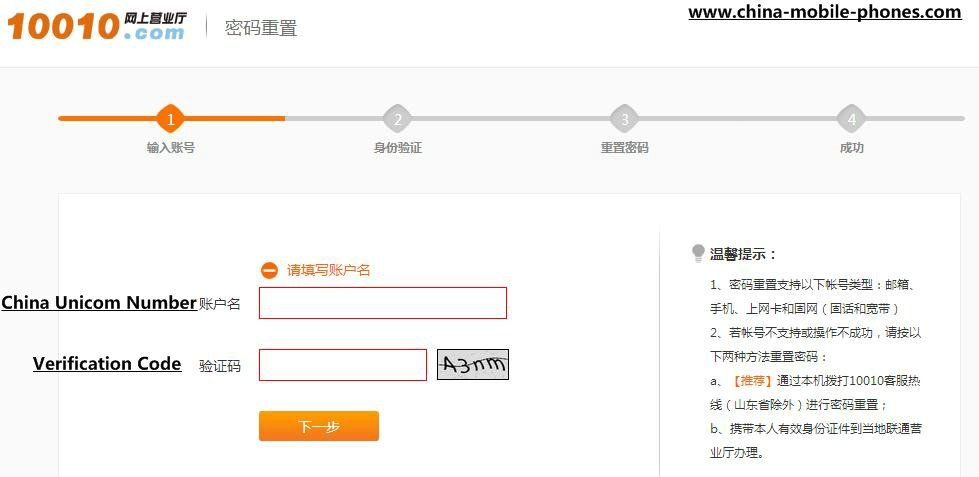
- Go to the China Unicom password reset page and enter your number plus the on-screen verification code, then click Next.
- A verification code is sent to your phone by SMS. Enter it on the website.
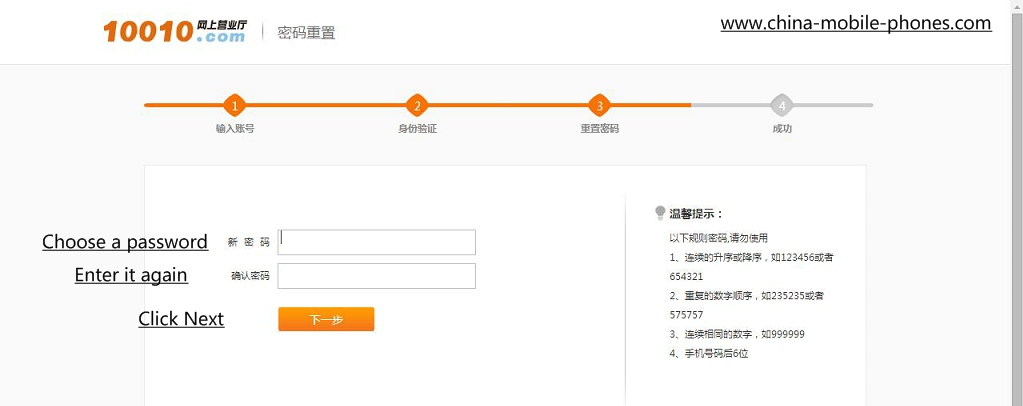
- Choose a 6-digit password that's hard to guess and confirm it.
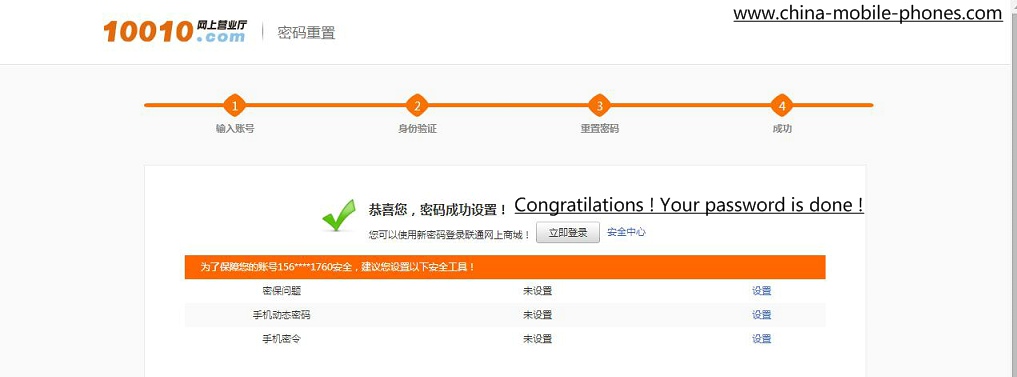
- Your password is now set.
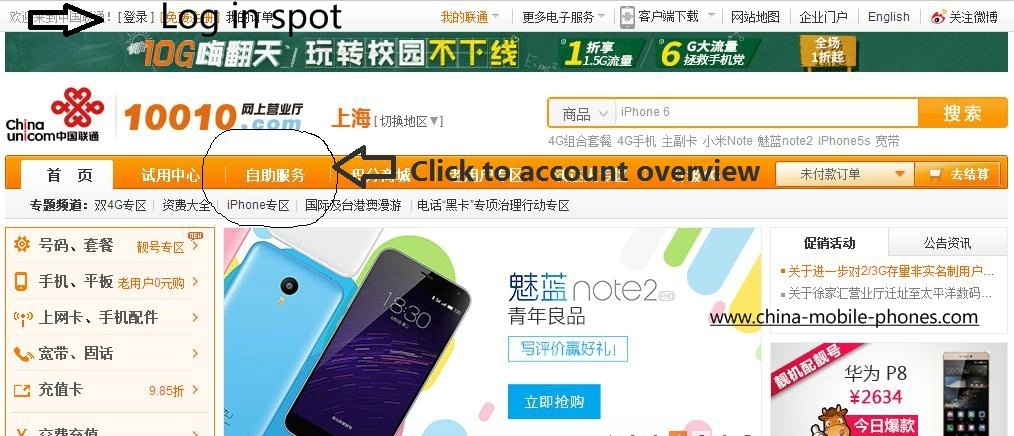
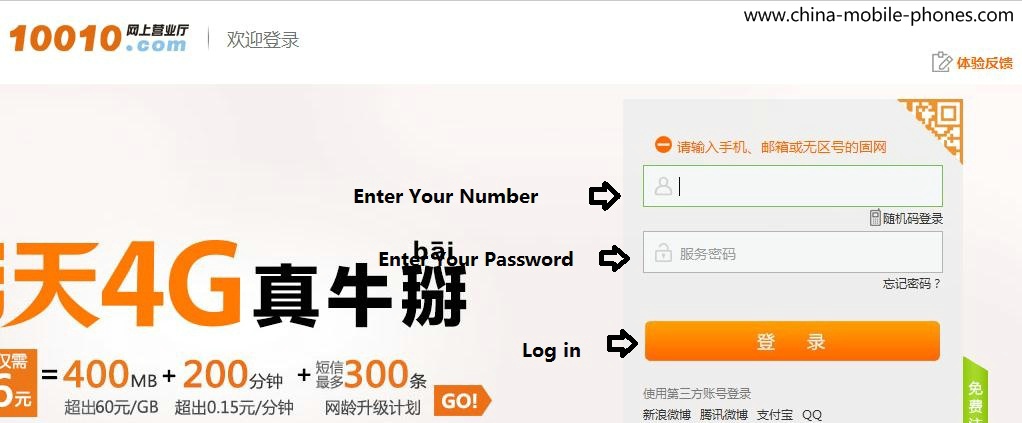
- Click the login link in the top-left corner of the China Unicom homepage.
- Enter your China Unicom number and the password you just created, then log in.
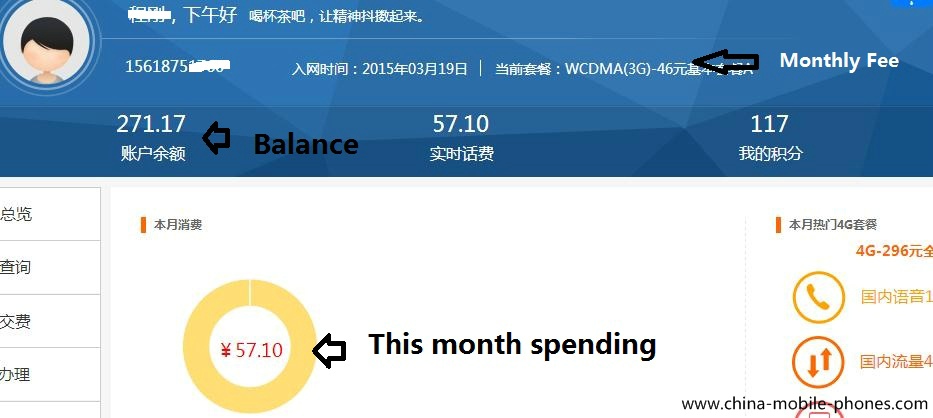
- Click your account icon to open the account overview, where your balance, this month's spending, and monthly charge are all displayed.
Method 4: WeChat & Alipay Mini-Programs
If you already use WeChat or Alipay in China, you can check your balance without installing a separate carrier app.
- Open WeChat or Alipay and search the built-in mini-program search for "中国联通" (China Unicom) or "手机充值" (mobile top-up).
- Link your China Unicom number the first time you use it — a bank card is required if you also want to top up from the same screen.
- Your current balance and data usage display on the mini-program's main page.
Method 5: Call China Unicom Customer Service
Dial 10010 from your China Unicom number and follow the voice prompts, or ask a live agent for your current balance. From outside China, dial +86 10010, though international call charges will apply unless you're using a China number with international add-on minutes.
Frequently Asked Questions
- How do I check my China Unicom balance from outside China?
- Use the China Unicom App, the website (after you've set up your password while still in China), or WeChat/Alipay if your number is already linked. The free SMS shortcodes (101/2082 to 10010) still work if your SIM has international roaming enabled, but you'll be billed roughly ¥0.36 (~$0.06 USD) per message instead of texting for free.
- Is there a fee to check my China Unicom balance by SMS?
- No. Texting 101 or 2082 to 10010, and dialing the *100# USSD code, are all free of charge.
- What does 余额 mean in a China Unicom balance text?
- 余额 (yú'é) means "balance" in Chinese. The number immediately after it in the reply SMS is your remaining balance in RMB.
- I forgot my China Unicom account password — what now?
- Use the password reset page while your phone has a live China Unicom connection, since the verification code is sent by SMS. You cannot reset the password once you've left China without a working China Unicom signal.
- Does this work for a Talktiko SIM card?
- Yes. Talktiko SIM cards run on the China Unicom network, so the free SMS shortcodes (101/2082 to 10010) work the same way.

Recent Articles


-
About China Mobile Phones | 20+ Years of China SIM & eSIM Expertise
Oct 13, 26 06:10 AM
 Meet Harry Cheng, founder of China Mobile Phones since 2003. Learn how this site tests and researches China SIM cards, eSIM, virtual numbers, and top-up methods first-hand.
 -
Beijing SIM Card & eSIM Guide: Coverage, Plans & Service Halls
Oct 13, 26 05:52 AM
 Planning a trip to Beijing? Compare eSIM, tourist SIM and China Mobile SIM options, see what to bring, and find Beijing service halls.
 -
Shandong SIM Card & eSIM Guide: Coverage, Plans & Service Halls
Oct 13, 26 05:49 AM
 Get connected in Shandong: eSIM vs SIM card comparison, airport options, province-wide coverage, and a directory of 50 China Mobile service halls in Qingdao.
To keep up to date, including special offers, please sign up our monthly service guide
Don't worry — your e-mail address is totally secure.
I promise to use it only to send you China Mobile Phones Service Monthly Guide.